![full_white.png]](https://wiki.solarinbound.com/hs-fs/hubfs/full_white.png?height=29&name=full_white.png)
Lifecycle Stages represent where a contact is in their customer journey. They provide a standardized way for Marketing, Sales, and Operations to understand a contact's current relationship with your company and power automation, reporting, and handoffs between teams.
Lifecycle Stage runs in the background and imperative when comes to marketing especially running paid ads.
Why Lifecycle Stages Matter
Lifecycle Stages are used throughout HubSpot and SunRaise to:
- Keep every department aligned on where a customer is in the buying journey.
- Trigger automations and workflows at the appropriate time.
- Measure marketing and sales conversion rates.
- Improve forecasting and pipeline reporting.
- Ensure contacts are only worked by the appropriate team at the right time.
Best Practice
A Lifecycle Stage should represent a meaningful milestone in the customer's journey, not an individual task or activity.
Lifecycle Journey
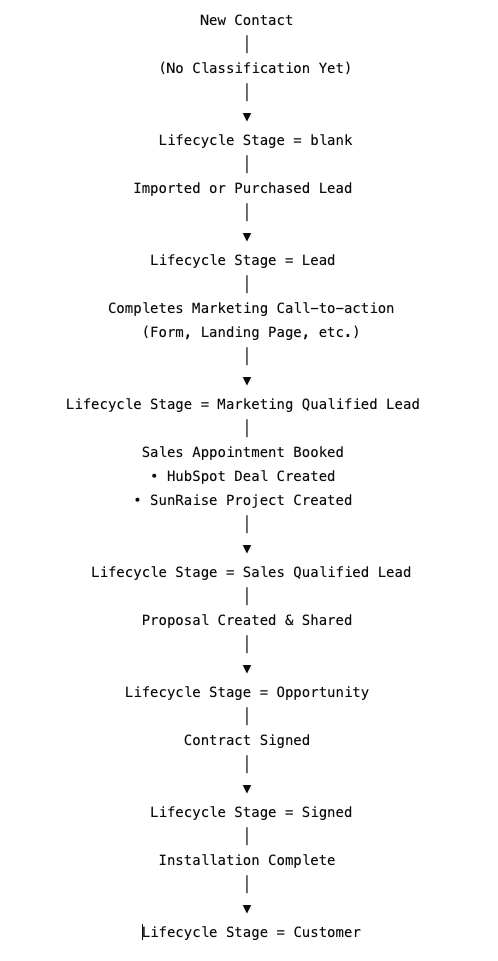
Stage Definitions
Lifecycle stage = blank
Description
Every newly created contact begins with a blank Lifecycle Stage unless they immediately qualify for another stage.
This prevents contacts from being incorrectly classified before enough information is known.
Examples
- Contact created by an integration
- Contact manually added
- Contact imported without qualification
Primary Owner
System
Lifecycle stage = Lead
Description
A Lead is an unqualified prospect that has not yet demonstrated buying intent.
Most Leads originate from:
- Purchased lead lists
- Data providers
- Cold prospect imports
- Other outbound marketing sources
These contacts generally have not provided direct consent to be solicited, so they should first receive marketing designed to encourage them to engage voluntarily.
Goal
Marketing should nurture Leads through:
- Email campaigns
- Educational content
- Landing pages
- Lead magnets
- Website forms
- Other calls-to-action
Exit Criteria
The contact completes a qualifying marketing conversion.
➡ Lifecycle Stage automatically updates to Marketing Qualified Lead.
Lifecycle stage = Marketing Qualified Lead (MQL)
Description
A Marketing Qualified Lead has demonstrated genuine interest by engaging with your marketing.
Examples include:
- Completing a lead form
- Requesting a consultation
- Downloading gated content
- Completing another qualifying call-to-action
Goal
The Setter begins active outreach to:
- Call the prospect
- Qualify interest
- Schedule a sales appointment
Exit Criteria
A sales appointment is successfully booked.
Automation will:
- Create a HubSpot Deal.
- Create a matching SunRaise Project.
- Begin synchronization between both records.
➡ Lifecycle Stage automatically updates to Sales Qualified Lead.
Lifecycle stage = Sales Qualified Lead (SQL)
Description
A Sales Qualified Lead has committed to meeting with Sales and now has an active sales process.
At this stage:
- A HubSpot Deal exists.
- A SunRaise Project exists.
- Both records remain synchronized throughout fulfillment.
Goal
Sales performs discovery, consultation, and prepares a proposal.
Exit Criteria
A proposal has been generated and shared with the customer.
➡ Lifecycle Stage automatically updates to Opportunity.
Lifecycle stage = Opportunity
Description
An Opportunity exists once pricing has been presented to the customer.
At this point:
- The customer understands the proposed solution.
- Pricing has been shared.
- There is an active revenue opportunity.
Goal
Guide the customer toward signing the agreement.
Exit Criteria
The agreement is signed.
➡ Lifecycle Stage automatically updates to Signed.
Lifecycle stage = Signed
Description
The customer has executed the agreement and the sale has officially been won.
Sales transitions the customer to Operations for project fulfillment.
Goal
Successfully complete the installation.
Exit Criteria
Installation has been completed.
➡ Lifecycle Stage automatically updates to Customer.
Lifecycle stage = Customer
Description
The project has been successfully installed and fulfilled.
The customer now moves into the long-term relationship phase.
Typical activities include:
- Customer support
- Referral requests
- Online reviews
- Cross-sell opportunities
- Additional services
- Future projects
Department Responsibilities
|
Lifecycle Stage |
Primary Team |
Primary Objective |
|
blank |
System |
Await classification |
|
Lead |
Marketing |
Generate conversion |
|
Marketing Qualified Lead |
Setter |
Book sales appointment |
|
Sales Qualified Lead |
Sales |
Conduct consultation |
|
Opportunity |
Sales |
Present proposal and close |
|
Signed |
Operations |
Fulfill the project |
|
Customer |
Customer Success & Marketing |
Retain, refer, and grow |
Automation Summary
| Customer Action | Automation |
| Contact created | Lifecycle Stage remains blank |
| Raw lead imported | Lifecycle Stage becomes lead |
| Marketing conversion completed | Lifecycle Stage becomes Marketing Qualified Lead |
| Sales appointment booked |
HubSpot deal and SunRaise project created/synced |
| Proposal shared | Lifecycle Stage becomes Opportunity |
| Contract signed | Lifecycle Stage becomes Signed |
| Installation complete | Lifecycle Stage becomes Customer |
Key Principles
Lifecycle Stages only move forward.
Contacts should not move backward unless there is a documented administrative correction.
Lifecycle Stages represent milestones not activities.
Making a phone call or sending an email does not change the Lifecycle Stage. Significant customer milestones do.
Automation manages Lifecycle Stages whenever possible.
Users should avoid manually updating Lifecycle Stages unless specifically instructed.
Quick Reference
| Stage | What It Means | Next Milestone |
|
blank |
Contact exists but has not yet been classified | Imported or qualified as a Lead |
| Lead | Raw prospect with no buying intent or consent | Marketing conversion |
| Marketing Qualified Lead | Marketing engagement completed | Sales appointment booked |
| Sales Qualified Lead | Deal and SunRaise project created | Proposal shared |
| Opportunity | Pricing presented | Contract signed |
| Signed | Contract executed | Installation completed |
| Customer | Installation complete | Ongoing relationship, referrals, upsells |